Dev-C++
Originally released by Bloodshed Software, but abandoned in 2006, it has recently been forked by Orwell, including a choice of more recent compilers. It can be downloaded from:
<a href="http://orwelldevcpp.blogspot.com/">http://orwelldevcpp.blogspot.com</a>Installation
Run the downloaded executable file, and follow its instructions. The default options are fine.Support for C++11
By default, support for the most recent version of C++ is not enabled. It shall be explicitly enabled by going to:Tools -> Compiler Options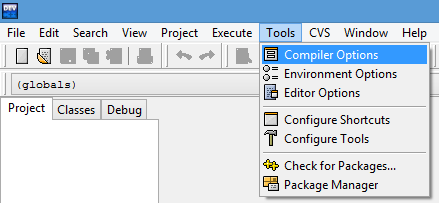
Here, select the "Settings" tab, and within it, the "Code Generation" tab. There, in "Language standard (-std)" select "ISO C++ 11":
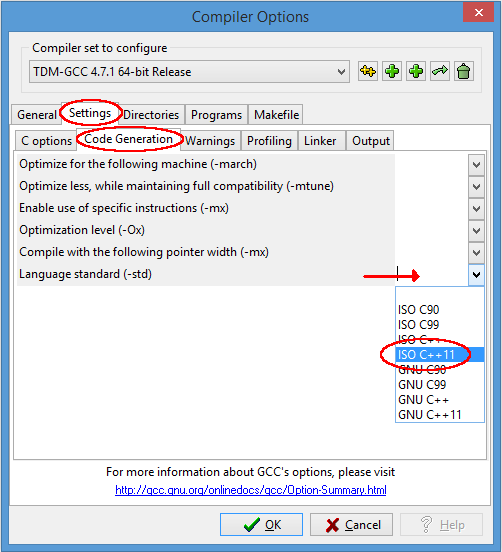
Ok that. You are now ready to compile C++11!
Compiling console applications
To compile and run simple console applications such as those used as examples in these tutorials it is enough with opening the file with Dev-C++ and hitF11.As an example, try:
File -> New -> Source File (or Ctrl+N)There, write the following:
Then:
File -> Save As... (or Ctrl+Alt+S)And save it with some file name with a
.cpp extension, such as example.cpp.Now, hitting
F11 should compile and run the program.
No comments:
Post a Comment