Showing posts with label c plus plus programming. Show all posts

Function Array Search in C Plus Plus

 Function Array Search in C Plus Plus. This is a C Plus Plus programming language program to input size of an array of integer numbers. The program will take item from the user to be searched in this array. If it finds the specified element in array, a suitable message of Item found on location is shown on the screen. Otherwise it will show a message of “Item not fond in this array”.

How this program works?

  1. First of all the user will enter size n of the array.
  2. Enter n items in array
  3. Input the item to be searched.
  4. Call the function search() with three arguments, array name, size n and item to be searched in array.
  5. The function search() will display location if item found or a ‘not found’ message.
  6. This function uses a for loop from 0 to n-1 for traversing he whole array.
  7. It compares each element of the array with given item to be searched.
  8. The sample run output of this program is at end of this tutorial.

Explanation of the User defined C Function

void search(int a[], int n, int item) 
{ 
int i; 
for (i = 0; i < n; i++) 
  { 
    if (a[i] == item) /* If required element is found */
      { cout<<item<<" is present at location "<<i+1<<" in the given array"; break; } 
  } 

if (i == n) cout<<item<<" isn't present in the array.\n"; 
}

Accept the parameters array a, size n and the item to search.

Write down a for loop from 0 to last element of the array.

Check if  the current array item is equal to the item.

If item is equal to the array element, display item found on the location.

Use break statement to terminate the loop.

After loop check if i is equal to n then show the message like “Item not found in array”.

The Source Code of C++ Program using Function Array Search

#include<iostream>
using namespace std;

void search(int a[], int n , int item);
int main()
{
  int a[100], item, i, n;

  cout<<"Enter number of elements in array[Maximum 100]=";
  cin>>n;

  
  for (i = 0; i < n; i++)
    {
    cout<<"Enter the Element Number "<<i+1<<" in Array=";
	cin>>a[i];
	}

  cout<<"Enter a number to search in the array=";
  cin>>item;

  // call to function

   search(a,n,item);  
    return 0;
}


  void search(int a[], int n, int item)
  {
  
  int i;
  for (i = 0; i < n; i++)
  {
    if (a[i] == item)    /* If required element is found */
    {
      cout<<item<<" is present at location "<<i+1<<" in the given array";
      break;
    }
  }
  if (i == n)
    cout<<item<<" isn't present in the given array.\n";
}

Second Version of Program Search Array

//Program to search an element from an array of integer numbers


#include<iostream>
using namespace std;

void search(int a[], int n , int item);
int main()
{
  int a[100], item, i, n;

  cout<<"Enter number of elements in array[Maximum 100]=";
  cin>>n;

  
  for (i = 0; i < n; i++)
    {
    cout<<"Enter Element Number "<<i+1<<" in Array=";
	cin>>a[i];
	}

  cout<<"Enter a number to search in array=";
  cin>>item;

  // call to function

   search(a,n,item);  
    return 0;
}


  void search(int a[], int n, int item)
  {
  
    int i;
    for (i = 0; i < n; i++)
     {
       if (a[i] == item)    /* If required element is found */
         {
           cout<<item<<" is present at location "<<i+1<<" in the given array";
           return;
         }
     } 
    cout<<item<<" isn't present in the given array.\n";
  }

Output of Search an Item in Array Program in C++

Enter number of elements in array[Maximum 100]=5
Enter Element Number 1 in Array=4
Enter Element Number 2 in Array=7
Enter Element Number 3 in Array=89
Enter Element Number 4 in Array=34
Enter Element Number 5 in Array=23
Enter a number to search in array=34
34 is present at location 4 in the given array
Enter number of elements in array[Maximum 100]=10
Enter Element Number 1 in Array=1
Enter Element Number 2 in Array=2
Enter Element Number 3 in Array=3
Enter Element Number 4 in Array=4
Enter Element Number 5 in Array=5
Enter Element Number 6 in Array=78
Enter Element Number 7 in Array=90
Enter Element Number 8 in Array=32
Enter Element Number 9 in Array=12
Enter Element Number 10 in Array=45
Enter a number to search in array=100
100 isn't present in the given array.
C Plus Plus Program Alphabet Triangle Pattern

 Task: Write down a C++ Program to display Alphabet Triangle Pattern. The user will enter the height of triangle. Then the program will show a right angle triangle of alphabets in Capital letters.

How Alphbets Triangle Program Works

This program uses nested for loops to display the required output pattern. The program asks the user to enter height of the triangle. The user will enetr a whole number like 5 or 10 etc. The program will display the right angle triangle of capital letters according to the required height.

The first loop uses a loop control variable row. This row variable shows the lines of the output. Wheras the variable col represents a column to display characters.

This program uses a char variable intialized with ‘A’. It will print A in first row. And it will print two characters A and B in second row and so on.

The outer for loop in nested loops is used to control the number of lines or rows. Whereas the col varible is used to print the required number of alphabetics.

The Source Code of Alphabets Triangle Program


// C++ Program to display 
// Right Angle Triangle
// of Capital Alphabets A,B,C
#include<iostream>

using namespace std;

int main()
{

  /*
   A
   AB
   ABC
   ABCD
   ABCDE 
  */

  char row,col,ch;
  int height;
  cout<<"Enter the height of Triangle=";
  cin>>height;
  for(row=1;row<=height;row++)
  {
  	 ch='A';
	 for(col=1;col<=row;col++)
  	   {
		cout<<ch<<" ";
		ch++;
	   }
  	cout<<endl;
  	
  }
  return 0;

}

/*
OUTPUT
Enter the height of Triangle=10
A
A B
A B C
A B C D
A B C D E
A B C D E F
A B C D E F G
A B C D E F G H
A B C D E F G H I
A B C D E F G H I J

--------------------------------
Process exited after 28.16 seconds with return value 0
Press any key to continue . . .
*/

Output of Alphabet Triangle Program


C++ Circle Area or Circumference Program

 Write a C++ Program To Calculate Circle Area or Circumference according to the User choice.

The Source Code of C++ Circle Program

// Write a program that uses two user defined functions
// for calculating area and circumference of a circle.
//The program will input radius and asks the user
// to enter a choice 1 or 2.
//If the user enters 1, it will display area
// if the user eneters 2 then circumference
//of the circle will be the output

#include<iostream>
using namespace std;
void area(float);
void circumference(float);
int main()
{
	float radius;
	int choice;
	cout<<"Enter Radius of Circle: ";
	cin>>radius;
	cout<<"Enter Your Choice 1 for Area and 2 for Circumference:";
	cin>>choice;
	
	if(choice==1)
	  area(radius);
	else if(choice==2)
	  circumference(radius);
	else
	  cout<<"Wrong choice!";
	
	return 0;
}


void area(float r)
{
	cout<<"Area of Circle="<<(3.1415 * r* r);
}
void circumference(float r)
{
	cout<<"Circumferenceb of Circle="<<(2.0 * 3.1415 * r);
}

Output of the C++ Circle Program Calculations

Enter Radius of Circle: 2.5
Enter Your Choice 1 for Area and 2 for Circumference:1
Area of Circle=19.6344
——————————–
Process exited after 18.92 seconds with return value 0
Press any key to continue . . .

Enter Radius of Circle: 2.5
Enter Your Choice 1 for Area and 2 for Circumference:2
Circumferenceb of Circle=15.7075
——————————–
Process exited after 21.03 seconds with return value 0
Press any key to continue . . .

Enter Radius of Circle: 5.26
Enter Your Choice 1 for Area and 2 for Circumference:1
Area of Circle=86.9178
——————————–
Process exited after 11.3 seconds with return value 0
Press any key to continue . . .

Enter Radius of Circle: 10.67
Enter Your Choice 1 for Area and 2 for Circumference:2
Circumferenceb of Circle=67.0396
——————————–
Process exited after 17.52 seconds with return value 0
Press any key to continue . . .

CPP Program to write / add records in Binary File

 How this Program Works?

This C++ Program will open a binary file either by creating a new file or by just opening it if it already exists. Then it will use write() method to write for first time or append more records in the existing file. It is because we have opened the file in append mode as follows:


//opening binary file in appending / writing mode

file1.open(“d://cppfile.dat”,ios::binary |ios::app);

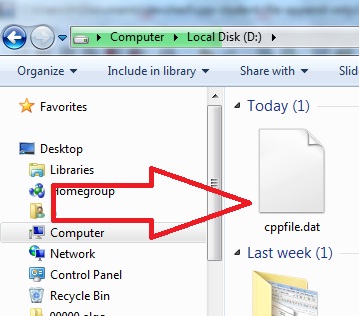
The following figure shows that the file cpppfile.dat has been created on D drive after execution f the C++ program.

C++ Program: write / add records in Binary File

First of all a user will input a record and it is written into binary file using write()method as follows:

/* write a record to binary file */
file1.write((char*)&srecord,sizeof(srecord));

Then program will ask from the user: Add more records? press y or n:

The user will press ‘y’ if he wishes to add more records. Otherwise he will type ‘n’, if he wishes to stop the program. This input logic is maintained by a while loop.

Source code for the C ++ program to enter records in a binary file.
/* Write a C Program to add more records at
end of already existing binary file
that is append file operation
*/
#include<iostream>
#include<fstream>
#include<conio.h>
#include<stdlib.h>
#include<string>
using namespace std;

struct student
{
int rollno;
char name[30];
}srecord;

fstream file1;
int main()
{
char ans;
int i;
//opening binary file in appending / writing mode	

file1.open("d://cppfile.dat",ios::binary |ios::app);

if(!file1)
{
cout<<"File could not open";
exit(0);
}

while(1)
{
cout<<"\nEnter Student Record\n";
cout<<"Roll No:";
cin>>srecord.rollno;
getchar();
cout<<"Name:";
gets(srecord.name);
/* write a record to binary file */
file1.write((char*)&srecord,sizeof(srecord));
cout<<"\nRecord has been added successfully";

cout<<"\nAdd more records? press y or n =";
ans=getche();
if(ans=='n' || ans=='N')
break;
}
file1.close();
cout<<"\nProgram ended: C++ Program To Add more Student Records in Binary File:";
return 0;
}

A Sample Run of the C++ Program: write / add records in Binary File

Enter Student Record
Roll No:101
Name:sajid

Record has been added successfully
Add more records? press y or n =y
Enter Student Record
Roll No:102
Name:majid

Record has been added successfully
Add more records? press y or n =n
Program ended: C++ Program To Add more Student Records in Binary File:
--------------------------------
Process exited after 41.99 seconds with return value 0
Press any key to continue . . .

C ++ Program To Display All File Records


The source code of C Plus Plus Program To Read and Display All Records from a Binary File

/* Write a C Program to read and display 
all records from an existing binary file
*/
#include<iostream>
#include<fstream>
#include<conio.h>
#include<stdlib.h>
#include<string>
using namespace std;

struct student
{
int rollno;
char name[30];
}srecord;

fstream file1;
int main()
{
char ans;
int i;
//opening binary file in reading mode	

file1.open("d://cppfile.dat",ios::binary |ios::in);

if(!file1)
{
cout<<"File could not open";
exit(0);
}

while(!file1.eof())
{
file1.read((char*)&srecord,sizeof(srecord));
if(!file1.eof())
{
cout<<"\n------------------\n";
cout<<"Roll No:"<<srecord.rollno;
cout<<"\nName:"<<srecord.name;
}
}
file1.close();
cout<<"\nProgram ended: C++ Program To Read and Display all Student Records from Binary File:";
return 0;
}

A sample run of the C++ Read Binary File Program

------------------
Roll No:1
Name:sajid
------------------
Roll No:2
Name:majid
Program ended: C++ Program To Read and Display all Student Records from Binary File:
--------------------------------
Process exited after 3.887 seconds with return value 0
Press any key to continue . . .

CPP Program to write / add records in Binary File


How this Program Works?

This C++ Program will open a binary file either by creating a new file or by just opening it if it already exists. Then it will use write() method to write for first time or append more records in the existing file. It is because we have opened the file in append mode as follows:

//opening binary file in appending / writing mode

file1.open(“d://cppfile.dat”,ios::binary |ios::app);

The following figure shows that the file cpppfile.dat has been created on D drive after execution f the C++ program.

C++ Program: write / add records in Binary File

C++ Program: write / add records in Binary File

First of all a user will input a record and it is written into binary file using write()method as follows:

/* write a record to binary file */
file1.write((char*)&srecord,sizeof(srecord));

Then program will ask from the user: Add more records? press y or n:

The user will press ‘y’ if he wishes to add more records. Otherwise he will type ‘n’, if he wishes to stop the program. This input logic is maintained by a while loop.

Source code for the C ++ program to enter records in a binary file.

/* Write a C Program to add more records at
end of already existing binary file
that is append file operation
*/
#include<iostream>
#include<fstream>
#include<conio.h>
#include<stdlib.h>
#include<string>
using namespace std;

struct student
{
int rollno;
char name[30];
}srecord;

fstream file1;
int main()
{
char ans;
int i;
//opening binary file in appending / writing mode	

file1.open("d://cppfile.dat",ios::binary |ios::app);

if(!file1)
{
cout<<"File could not open";
exit(0);
}

while(1)
{
cout<<"\nEnter Student Record\n";
cout<<"Roll No:";
cin>>srecord.rollno;
getchar();
cout<<"Name:";
gets(srecord.name);
/* write a record to binary file */
file1.write((char*)&srecord,sizeof(srecord));
cout<<"\nRecord has been added successfully";

cout<<"\nAdd more records? press y or n =";
ans=getche();
if(ans=='n' || ans=='N')
break;
}
file1.close();
cout<<"\nProgram ended: C++ Program To Add more Student Records in Binary File:";
return 0;
}

A Sample Run of the C++ Program: write / add records in Binary File

Enter Student Record
Roll No:101
Name:sajid

Record has been added successfully
Add more records? press y or n =y
Enter Student Record
Roll No:102
Name:majid

Record has been added successfully
Add more records? press y or n =n
Program ended: C++ Program To Add more Student Records in Binary File:
--------------------------------
Process exited after 41.99 seconds with return value 0
Press any key to continue . . .

C ++ Program To Display All File Records


The source code of C Plus Plus Program To Read and Display All Records from a Binary File

/* Write a C Program to read and display 
all records from an existing binary file
*/
#include<iostream>
#include<fstream>
#include<conio.h>
#include<stdlib.h>
#include<string>
using namespace std;

struct student
{
int rollno;
char name[30];
}srecord;

fstream file1;
int main()
{
char ans;
int i;
//opening binary file in reading mode	

file1.open("d://cppfile.dat",ios::binary |ios::in);

if(!file1)
{
cout<<"File could not open";
exit(0);
}

while(!file1.eof())
{
file1.read((char*)&srecord,sizeof(srecord));
if(!file1.eof())
{
cout<<"\n------------------\n";
cout<<"Roll No:"<<srecord.rollno;
cout<<"\nName:"<<srecord.name;
}
}
file1.close();
cout<<"\nProgram ended: C++ Program To Read and Display all Student Records from Binary File:";
return 0;
}

A sample run of the C++ Read Binary File Program

------------------
Roll No:1
Name:sajid
------------------
Roll No:2
Name:majid
Program ended: C++ Program To Read and Display all Student Records from Binary File:
--------------------------------
Process exited after 3.887 seconds with return value 0
Press any key to continue . . .

Menu Driven C++ Program To Read and Write in Binary File

 Task: Menu Driven ( C++ ) C Plus Plus Program To Read and Write in Binary File. How This C++ File Program Works? This C++ program uses a menu driven approach.


Menu Driven ( C++ ) C Plus Plus Program To Read and Write in Binary File.

It displays a menu on screen as follows:

+-+-+-+-+-+-+-+-+-+-+-+-+-+-+-+-+-+-+-+
+              Menu                   +
+-+-+-+-+-+-+-+-+-+-+-+-+-+-+-+-+-+-+-+
+ 1. Add Records of Students in File  +
+ 2. Display Records of Students      +
+ 3. Exit                             +
+-+-+-+-+-+-+-+-+-+-+-+-+-+-+-+-+-+-+-+
Enter your choice 1, 2 or 3:1

As you can see, the C++ filing Program is asking the user to enter his choice 1, 2 or 3. If the user enters 1 and press Enter key, this will start ‘adding records process’.

Enter Student Record
Roll No:1
Name:Ahmad

Record has been added successfully
Add more records? press y or n =y
Enter Student Record
Roll No:2
Name:Shahid

Record has been added successfully
Add more records? press y or n =n

Therefore, the user adds two records and then he enters n to stop adding records process. This will display the menu again on screen. Further, if the user enters 2 as his choice, the program will show all ( that is 2) records on screen. This program will display the menu again. If the user enters 3 then the program will be terminated.

The Source Code of this Menu Driven C++ Program To Read and Write in Binary File

/* ====================================================*/
/*                                                     */
/*                                                     */
/*   (c) 2019 Author: wwww.EasyCodeBook.com            */
/*                                                     */
/*   Description                                       */
/*   Write a C++ Program to read and write records in  */
/*     binary file. Use a menu driven approach         */
/*                                                     */
/* ====================================================*/


#include<iostream>
#include<fstream>
#include<conio.h>
#include<stdlib.h>
#include<string>
using namespace std;

void addRecords();
void displayRecords();

struct student
{
int rollno;
char name[30];
}srecord;

fstream file1;
int main()
{

int choice=1;

while(1)
{
  // prnit menu
  
  cout<<"\n";
  cout<<"+-+-+-+-+-+-+-+-+-+-+-+-+-+-+-+-+-+-+-+\n";
  cout<<"+                  Menu               +\n";
  cout<<"+-+-+-+-+-+-+-+-+-+-+-+-+-+-+-+-+-+-+-+\n";
  cout<<"+ 1. Add Records of Students in File  +\n";
  cout<<"+ 2. Display Records of Students      +\n";
  cout<<"+ 3. Exit                             +\n";
  cout<<"+-+-+-+-+-+-+-+-+-+-+-+-+-+-+-+-+-+-+-+\n";
  cout<<"Enter your choice 1, 2 or 3:";
  
  cin>>choice;
  if(choice==1)
   addRecords();
  else if (choice==2)
   displayRecords();
  else if (choice==3)
  break;
  else
  cout<<"\n Invalid choice, Enter 1, 2 or 3 only:";
  
}
 cout<<"\nThanks for visiting www.EasyCodeBook.com";
}

void addRecords()
{
char ans;
int i;
//opening binary file in appending / writing mode	
file1.open("d://cppfile.dat",ios::binary |ios::app);

if(!file1)
{
cout<<"File could not open";
exit(0);
}
cout<<"\n*******Adding Records*********\n";
while(1)
{
cout<<"\nEnter Student Record\n";
cout<<"Roll No:";
cin>>srecord.rollno;
getchar();
cout<<"Name:";
gets(srecord.name);
/* write a record to binary file */
file1.write((char*)&srecord,sizeof(srecord));
cout<<"\nRecord has been added successfully";

cout<<"\nAdd more records? press y or n =";
ans=getche();
if(ans=='n' || ans=='N')
{
file1.close();
break;
}
}
}
void displayRecords()
{
int i;
//opening binary file in reading mode	

file1.open("d://cppfile.dat",ios::binary |ios::in);

if(!file1)
{
cout<<"File could not open";
exit(0);
}
cout<<"\n***Reading & Displaying Records***\n";
while(!file1.eof())
{
file1.read((char*)&srecord,sizeof(srecord));
if(!file1.eof())
{
cout<<"\n------------------\n";
cout<<"Roll No:"<<srecord.rollno;
cout<<"\nName:"<<srecord.name;
}
}
file1.close();
}

A Sample Run with Output of Menu Driven C++ Program To Read and Write in Binary File

+-+-+-+-+-+-+-+-+-+-+-+-+-+-+-+-+-+-+-+
+                Menu                 +
+-+-+-+-+-+-+-+-+-+-+-+-+-+-+-+-+-+-+-+
+ 1. Add Records of Students in File  +
+ 2. Display Records of Students      +
+ 3. Exit                             +
+-+-+-+-+-+-+-+-+-+-+-+-+-+-+-+-+-+-+-+
Enter your choice 1, 2 or 3:1

*******Adding Records*********

Enter Student Record
Roll No:1
Name:Ahmad

Record has been added successfully
Add more records? press y or n =y
Enter Student Record
Roll No:2
Name:Shahid

Record has been added successfully
Add more records? press y or n =n
+-+-+-+-+-+-+-+-+-+-+-+-+-+-+-+-+-+-+-+
+                Menu                 +
+-+-+-+-+-+-+-+-+-+-+-+-+-+-+-+-+-+-+-+
+ 1. Add Records of Students in File  +
+ 2. Display Records of Students      +
+ 3. Exit                             +
+-+-+-+-+-+-+-+-+-+-+-+-+-+-+-+-+-+-+-+
Enter your choice 1, 2 or 3:2

***Reading & Displaying Records***

------------------
Roll No:1
Name:Ahmad
------------------
Roll No:2
Name:Shahid
+-+-+-+-+-+-+-+-+-+-+-+-+-+-+-+-+-+-+-+
+                Menu                 +
+-+-+-+-+-+-+-+-+-+-+-+-+-+-+-+-+-+-+-+
+ 1. Add Records of Students in File  +
+ 2. Display Records of Students      +
+ 3. Exit                             +
+-+-+-+-+-+-+-+-+-+-+-+-+-+-+-+-+-+-+-+
Enter your choice 1, 2 or 3:3

Thanks for visiting www.EasyCodeBook.com
--------------------------------
Process exited after 1017 seconds with return value 0
Press any key to continue . . .

Copy All Records to Another File Program in C Plus Plus

 This program will open the source file in reading ( in ) mode. It will open the destination file in writing (out) mode. Then the program will read all records from source file one by one. And copy every record to destination file.


C++ Program to copy all record from binary file to another file

This record copy process is in a while loop. It will continue to copy records as long as end of file (source file) is not reached.
Finally, this C++ file copy program will display a message: ‘File Copied successfully’ etc.

The source code of Copy All Records to Another File Program in C Plus Plus

/* Write a C++ Program to copy all
records of a binary file 'cppfile.dat'
into'copyfile.dat' 
*/
#include<iostream>
#include<fstream>
#include<conio.h>
#include<stdlib.h>
#include<string>
using namespace std;

struct student
{
int rollno;
char name[30];
}srecord;

int main()
{
char ans;

fstream file1, file2;
//opening source binary file in writing mode
// if we run this program again, it will
//overwrite the destination file	

file1.open("d://cppfile.dat",ios::binary |ios::in);

if(!file1)
{
cout<<"Source File could not open";
exit(0);
}

//opening destination binary file in reading mode	

file2.open("d://copyfile.dat",ios::binary |ios::out);

if(!file2)
{
cout<<"Destination File could not open";
exit(0);
}

while(!file1.eof())
{
file1.read((char*)&srecord,sizeof(srecord));
if(!file1.eof())
file2.write((char*)&srecord,sizeof(srecord));
}
file1.close();
file2.close();
cout<<"\nFile copied successfully.\n Thanks for visiting www.EasyCodebook.com";
return 0;
}

A sample run output :C++ Program to copy all record from binary file to another file