C ++ Program To Display All File Records


The source code of C Plus Plus Program To Read and Display All Records from a Binary File

/* Write a C Program to read and display 
all records from an existing binary file
*/
#include<iostream>
#include<fstream>
#include<conio.h>
#include<stdlib.h>
#include<string>
using namespace std;

struct student
{
int rollno;
char name[30];
}srecord;

fstream file1;
int main()
{
char ans;
int i;
//opening binary file in reading mode	

file1.open("d://cppfile.dat",ios::binary |ios::in);

if(!file1)
{
cout<<"File could not open";
exit(0);
}

while(!file1.eof())
{
file1.read((char*)&srecord,sizeof(srecord));
if(!file1.eof())
{
cout<<"\n------------------\n";
cout<<"Roll No:"<<srecord.rollno;
cout<<"\nName:"<<srecord.name;
}
}
file1.close();
cout<<"\nProgram ended: C++ Program To Read and Display all Student Records from Binary File:";
return 0;
}

A sample run of the C++ Read Binary File Program

------------------
Roll No:1
Name:sajid
------------------
Roll No:2
Name:majid
Program ended: C++ Program To Read and Display all Student Records from Binary File:
--------------------------------
Process exited after 3.887 seconds with return value 0
Press any key to continue . . .

Menu Driven C++ Program To Read and Write in Binary File

 Task: Menu Driven ( C++ ) C Plus Plus Program To Read and Write in Binary File. How This C++ File Program Works? This C++ program uses a menu driven approach.


Menu Driven ( C++ ) C Plus Plus Program To Read and Write in Binary File.

It displays a menu on screen as follows:

+-+-+-+-+-+-+-+-+-+-+-+-+-+-+-+-+-+-+-+
+              Menu                   +
+-+-+-+-+-+-+-+-+-+-+-+-+-+-+-+-+-+-+-+
+ 1. Add Records of Students in File  +
+ 2. Display Records of Students      +
+ 3. Exit                             +
+-+-+-+-+-+-+-+-+-+-+-+-+-+-+-+-+-+-+-+
Enter your choice 1, 2 or 3:1

As you can see, the C++ filing Program is asking the user to enter his choice 1, 2 or 3. If the user enters 1 and press Enter key, this will start ‘adding records process’.

Enter Student Record
Roll No:1
Name:Ahmad

Record has been added successfully
Add more records? press y or n =y
Enter Student Record
Roll No:2
Name:Shahid

Record has been added successfully
Add more records? press y or n =n

Therefore, the user adds two records and then he enters n to stop adding records process. This will display the menu again on screen. Further, if the user enters 2 as his choice, the program will show all ( that is 2) records on screen. This program will display the menu again. If the user enters 3 then the program will be terminated.

The Source Code of this Menu Driven C++ Program To Read and Write in Binary File

/* ====================================================*/
/*                                                     */
/*                                                     */
/*   (c) 2019 Author: wwww.EasyCodeBook.com            */
/*                                                     */
/*   Description                                       */
/*   Write a C++ Program to read and write records in  */
/*     binary file. Use a menu driven approach         */
/*                                                     */
/* ====================================================*/


#include<iostream>
#include<fstream>
#include<conio.h>
#include<stdlib.h>
#include<string>
using namespace std;

void addRecords();
void displayRecords();

struct student
{
int rollno;
char name[30];
}srecord;

fstream file1;
int main()
{

int choice=1;

while(1)
{
  // prnit menu
  
  cout<<"\n";
  cout<<"+-+-+-+-+-+-+-+-+-+-+-+-+-+-+-+-+-+-+-+\n";
  cout<<"+                  Menu               +\n";
  cout<<"+-+-+-+-+-+-+-+-+-+-+-+-+-+-+-+-+-+-+-+\n";
  cout<<"+ 1. Add Records of Students in File  +\n";
  cout<<"+ 2. Display Records of Students      +\n";
  cout<<"+ 3. Exit                             +\n";
  cout<<"+-+-+-+-+-+-+-+-+-+-+-+-+-+-+-+-+-+-+-+\n";
  cout<<"Enter your choice 1, 2 or 3:";
  
  cin>>choice;
  if(choice==1)
   addRecords();
  else if (choice==2)
   displayRecords();
  else if (choice==3)
  break;
  else
  cout<<"\n Invalid choice, Enter 1, 2 or 3 only:";
  
}
 cout<<"\nThanks for visiting www.EasyCodeBook.com";
}

void addRecords()
{
char ans;
int i;
//opening binary file in appending / writing mode	
file1.open("d://cppfile.dat",ios::binary |ios::app);

if(!file1)
{
cout<<"File could not open";
exit(0);
}
cout<<"\n*******Adding Records*********\n";
while(1)
{
cout<<"\nEnter Student Record\n";
cout<<"Roll No:";
cin>>srecord.rollno;
getchar();
cout<<"Name:";
gets(srecord.name);
/* write a record to binary file */
file1.write((char*)&srecord,sizeof(srecord));
cout<<"\nRecord has been added successfully";

cout<<"\nAdd more records? press y or n =";
ans=getche();
if(ans=='n' || ans=='N')
{
file1.close();
break;
}
}
}
void displayRecords()
{
int i;
//opening binary file in reading mode	

file1.open("d://cppfile.dat",ios::binary |ios::in);

if(!file1)
{
cout<<"File could not open";
exit(0);
}
cout<<"\n***Reading & Displaying Records***\n";
while(!file1.eof())
{
file1.read((char*)&srecord,sizeof(srecord));
if(!file1.eof())
{
cout<<"\n------------------\n";
cout<<"Roll No:"<<srecord.rollno;
cout<<"\nName:"<<srecord.name;
}
}
file1.close();
}

A Sample Run with Output of Menu Driven C++ Program To Read and Write in Binary File

+-+-+-+-+-+-+-+-+-+-+-+-+-+-+-+-+-+-+-+
+                Menu                 +
+-+-+-+-+-+-+-+-+-+-+-+-+-+-+-+-+-+-+-+
+ 1. Add Records of Students in File  +
+ 2. Display Records of Students      +
+ 3. Exit                             +
+-+-+-+-+-+-+-+-+-+-+-+-+-+-+-+-+-+-+-+
Enter your choice 1, 2 or 3:1

*******Adding Records*********

Enter Student Record
Roll No:1
Name:Ahmad

Record has been added successfully
Add more records? press y or n =y
Enter Student Record
Roll No:2
Name:Shahid

Record has been added successfully
Add more records? press y or n =n
+-+-+-+-+-+-+-+-+-+-+-+-+-+-+-+-+-+-+-+
+                Menu                 +
+-+-+-+-+-+-+-+-+-+-+-+-+-+-+-+-+-+-+-+
+ 1. Add Records of Students in File  +
+ 2. Display Records of Students      +
+ 3. Exit                             +
+-+-+-+-+-+-+-+-+-+-+-+-+-+-+-+-+-+-+-+
Enter your choice 1, 2 or 3:2

***Reading & Displaying Records***

------------------
Roll No:1
Name:Ahmad
------------------
Roll No:2
Name:Shahid
+-+-+-+-+-+-+-+-+-+-+-+-+-+-+-+-+-+-+-+
+                Menu                 +
+-+-+-+-+-+-+-+-+-+-+-+-+-+-+-+-+-+-+-+
+ 1. Add Records of Students in File  +
+ 2. Display Records of Students      +
+ 3. Exit                             +
+-+-+-+-+-+-+-+-+-+-+-+-+-+-+-+-+-+-+-+
Enter your choice 1, 2 or 3:3

Thanks for visiting www.EasyCodeBook.com
--------------------------------
Process exited after 1017 seconds with return value 0
Press any key to continue . . .

Copy All Records to Another File Program in C Plus Plus

 This program will open the source file in reading ( in ) mode. It will open the destination file in writing (out) mode. Then the program will read all records from source file one by one. And copy every record to destination file.


C++ Program to copy all record from binary file to another file

This record copy process is in a while loop. It will continue to copy records as long as end of file (source file) is not reached.
Finally, this C++ file copy program will display a message: ‘File Copied successfully’ etc.

The source code of Copy All Records to Another File Program in C Plus Plus

/* Write a C++ Program to copy all
records of a binary file 'cppfile.dat'
into'copyfile.dat' 
*/
#include<iostream>
#include<fstream>
#include<conio.h>
#include<stdlib.h>
#include<string>
using namespace std;

struct student
{
int rollno;
char name[30];
}srecord;

int main()
{
char ans;

fstream file1, file2;
//opening source binary file in writing mode
// if we run this program again, it will
//overwrite the destination file	

file1.open("d://cppfile.dat",ios::binary |ios::in);

if(!file1)
{
cout<<"Source File could not open";
exit(0);
}

//opening destination binary file in reading mode	

file2.open("d://copyfile.dat",ios::binary |ios::out);

if(!file2)
{
cout<<"Destination File could not open";
exit(0);
}

while(!file1.eof())
{
file1.read((char*)&srecord,sizeof(srecord));
if(!file1.eof())
file2.write((char*)&srecord,sizeof(srecord));
}
file1.close();
file2.close();
cout<<"\nFile copied successfully.\n Thanks for visiting www.EasyCodebook.com";
return 0;
}

A sample run output :C++ Program to copy all record from binary file to another file


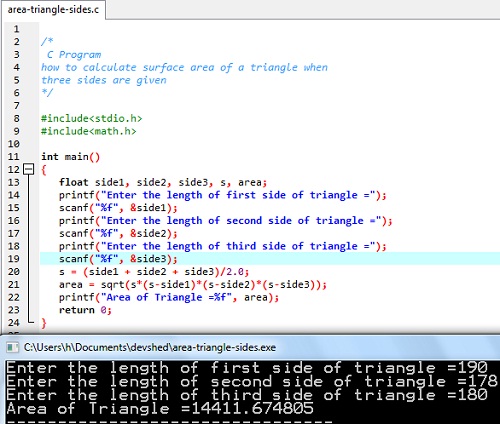
Compute area of Triangle Input Three Sides

 /*

 C Program 
how to calculate surface area of a triangle when 
three sides are given
*/

#include<stdio.h>
#include<math.h>

int main()
{
   float side1, side2, side3, s, area;
   printf("Enter the length of first side of triangle =");
   scanf("%f", &side1);
   printf("Enter the length of second side of triangle =");
   scanf("%f", &side2);
   printf("Enter the length of third side of triangle =");
   scanf("%f", &side3);
   s = (side1 + side2 + side3)/2.0;
   area = sqrt(s*(s-side1)*(s-side2)*(s-side3));
   printf("Area of Triangle =%f", area);
   return 0;
}

mage of how to calculate surface area of a triangle when
three sides are given.

how to calculate surface area of a triangle when  three sides are given

C++ Program Temperature Conversion Using Class and Objects


Source Code For C++ Program Temperature Conversion Class

/* Write a C++ Program to design a class Temperature
with two float variables fahren and celsius
and a member function 'conversion' to convert 
fahrenheit into celsius
*/
#include<iostream>

using namespace std;

// define a class Temperature

class Temperature
{
	private:
	float fahren, celsius;
	public:
	float conversion(float f)
	{
		fahren=f;
		celsius=(fahren-32)* 5.0/9.0;
		return celsius;
	}
	
};
int main()
{
	// define an object of Temperature class
	Temperature t;
	float f;
	cout<<"Enter Temperature in Fahrenheit=";
	cin>>f;
	// call conversion function with object t
	cout<<"Temperature in Celsius="<<t.conversion(f);

return 0;
}

Output and Sample Run of C++ Program for Temperature conversion using class and objects, Object oriented Programming

Enter Temperature in Fahrenheit=98.6
Temperature in Celsius=37
--------------------------------
Process exited after 29.55 seconds with return value 0
Press any key to continue . . .

Detail of C++ Program for Design and Use Triangle Class

 Write a C++ Program to design a class Triangle with two float variables ‘base’ and ‘height’ and three member functions

1. void setBase(float b) to set value of base
2. void setHeight(float h) to set value of base
3. float area() to calculate area of triangle
with formula area = 1/2 x base x height.

Source code 

/* Write a C++ Program to design a class Triangle
with two float variables 'base' and 'height'
and three member functions
 1. void setBase(float b) to set value of base
 2. void setHeight(float h) to set value of base
 3. float area() to calculate area of triangle
 with formula area = 1/2 x base x height

*/
#include<iostream>

using namespace std;

// define a class Temperature

class Triangle
{
	private:
	float base, height;
	public:
	void setBase(float b)
	{
		base = b;
	}
	void setHeight(float h)
	{
		height = h;
	}
	float area()
	{
		float a;
		a= 1.0 / 2.0 * base * height;
		return a;
	}
	
};
int main()
{
	// define an object of Triangle class
	Triangle triangle1;
	float b,h;
	cout<<"Enter base and height of triangle=";
	cin>>b>>h;
	// set value of base
	triangle1.setBase(b);
	// set value of height
	triangle1.setHeight(h);
	// call area() function with object triangle1
	cout<<"Area of Triangle="<<triangle1.area();

return 0;
}

How this Program works?

  • We will define a class Triangle using class keyword.
  • Two member variables are base and height of triangle.
  • There are two member functions: setBase() and setHeight() to set or change the values of member variables.
  • There is a member function to calculate area of triangle, called area() that will return area of the triangle.
  • The main function has statements to get two values from the user for base and height.
  • There are statements to create an object triangle1 of Triangle class.
  • We will set base and height by calling the corresponding memebr functions.
  • Then we call the function area() that will calculate and return the area of triangle1 object with given base and height.
  • The area is printed using cout.

Output:

Enter base and height of triangle=4.4
6.5
Area of Triangle=14.3

Reverse Number Code C Plus Plus


The Source Code of C++ Program:Reverse Number Code C Plus Plus

// Write a C++ program to input a number
// and display its Reverse Number
// For example, if you Enter number=123
// Program will show Reverse number=321

#include<iostream>

using namespace std;
int main()
{
	long int num,n,rev;
	printf("Enter an Integer Number:");
	cin>>num;
	rev=0;
	for(n=num;n!=0;n=n/10)
	rev=(10*rev)+n%10;
	cout<<"Actual Number: "<<num<<endl;
	cout<<"Reverse Number: "<<rev;
	return 0;
}

The output of the C++ Program Reverse Number

Enter an Integer Number:1236
Actual Number: 1236
Reverse Number: 6321

Another Sample Run Output:

Enter an Integer Number:675213
Actual Number: 675213
Reverse Number: 312576

Basic Bubble Sort Code in C++

 Task: Basic Bubble Sort Code in C++

// Write a C++ program to input 10 numbers in arra
//   and sort these numbers in ascending orde
// using  Bubble sort algorith

#include<iostream>
#include<conio.h>
using namespace std;
 int main()
{
	int arr[10],i,j, temp;
	for(i=0;i<10;i++)
	{
		cout<<"Enter Number "<<(i+1)<<":";
		cin>>arr[i];
	}
	cout<<"Array Values before sorting:"<<endl;
	for(i=0;i<10;i++)
	cout<<arr[i]<<", ";


	for(i=0;i<10;i++)
	for(j=0;j<10-i-1;j++)
		if (arr[j]>arr[j+1])
		{
			temp=arr[j];
			arr[j]=arr[j+1];
			arr[j+1]=temp;	
		}
	cout<<"\nArray Values after sorting in ascending order using Bubble Sort Algorithm:"<<endl;
	for (i=0;i<10;i++)
	cout<<arr[i]<<", ";
    return 0;


}

The output of Simple Bubble Sort C++ Program

Enter Number 1:34
Enter Number 2:-1
Enter Number 3:-2
Enter Number 4:45
Enter Number 5:67
Enter Number 6:8
Enter Number 7:123
Enter Number 8:456
Enter Number 9:6
Enter Number 10:6
Array Values before sorting:
34, -1, -2, 45, 67, 8, 123, 456, 6, 6,
Array Values after sorting in ascending order using Bubble Sort Algorithm:
-2, -1, 6, 6, 8, 34, 45, 67, 123, 456,

Output 2

Enter Number 1:3
Enter Number 2:4
Enter Number 3:55
Enter Number 4:67
Enter Number 5:89
Enter Number 6:0
Enter Number 7:12
Enter Number 8:3
Enter Number 9:4
Enter Number 10:5
Array Values before sorting:
3, 4, 55, 67, 89, 0, 12, 3, 4, 5,
Array Values after sorting in ascending order using Bubble Sort Algorithm:
3, 4, 55, 67, 89, 0, 12, 3, 4, 5,
Fibonacci Sequence Generator Using Array C++


The Source Code for Fibonacci Sequence Generator Using Array

// Write a C++ program to input number of terms
// of FIBONACCI Series required, then
// display Fibonacci Terms using Array

#include<iostream>
#include<conio.h>
using namespace std;
int main()
{
	//write program to generate FIBONACII series upto n terms using array
	int arr[100],i,n;
	cout<<"Enter Number of Fibonacci Terms required:";
	cin>>n;
	// Since first two terms are 0,1
	arr[0]=0;
	arr[1]=1;
	// use for loop to find remaining terms 
	for(i=2;i<n;i++)
	  arr[i]=arr[i-1]+arr[i-2];
	
	cout<<"Required "<<n<<" Fibonaccii Terms are:"<<endl;
	for (i=0;i<n;i++)
	cout<<arr[i]<<", ";

	return 0;
}

Out put of the sample run of Fibonacci Terms using Array C++ Program

Enter Number of Fibonacci Terms required:10
Required 10 Fibonaccii Terms are:
0, 1, 1, 2, 3, 5, 8, 13, 21, 34,
--------------------------------
Process exited after 55.6 seconds with return value 0
Press any key to continue . . .

Reverse Number Sequence in Array C Plus Plus


The Source Code of Reverse Number Sequence in Array C Plus Plus Program

// Write a C++ program to input 10 numbers
// in array then display actual array
// and in reverse order from last to first
//element.

#include<iostream>
#include<conio.h>
using namespace std;
int main()
{
	
	int arr[10],i;
	for(i=0;i<10;i++)
	{
		cout<<"Enter Number "<<(i+1)<<"  :";
		cin>>arr[i];
	}
	cout<<"Array in Actual order is:"<<endl;
	for (i=0;i<10;i++)
	cout<<arr[i]<<", ";
	cout<<"\nArray in Reverse order is:"<<endl;
	for (i=9;i>=0;i--)
	cout<<arr[i]<<", ";

	return 0;
}

Output of C++ Program to print array in reverse order sequence

Enter Number 1  :12
Enter Number 2  :2
Enter Number 3  :3
Enter Number 4  :67
Enter Number 5  :8
Enter Number 6  :10
Enter Number 7  :112
Enter Number 8  :760
Enter Number 9  :11
Enter Number 10  :55
Array in Actual order is:
12, 2, 3, 67, 8, 10, 112, 760, 11, 55,
Array in Reverse order is:
55, 11, 760, 112, 10, 8, 67, 3, 2, 12,
--------------------------------
Process exited after 43.05 seconds with return value 0
Press any key to continue . . .